Make a Monte Carlo simulation of your trading records!
The purpose of constructing a Monte Carlo simulation of your trading results is so that you can VARY THE SEQUENCE of trades. By doing this, you obtain different outcomes in your system performance statistics. Varying the sequence of trades does not change the ending equity amount, because you are using the same trades as originally but in a different order.
Perhaps your highly esteemed trading system’s performance data is the result of having a lucky sequence of trades, where the drawdown was minimal and the stress on equity balance was mild. If you run a Monte Carlo simulation of your trading results (all wins and all losses), you will have a different sequence (or another 100 different sequences, or even thousands of different sequences), and you can compare outcome to determine just how lucky your original sequence of trades actually was.
A Monte Carlo simulation of your trading results helps to answer these questions: What are the chances of my starting equity level being eroded by 30% ? And what is my limit on the amount of equity drawdown I could tolerate? What if I received 7 losses in a row, or more, in a randomized sequence? How large are the peak-to-valley drawdowns in this particular trading strategy, in $ amounts and in % amounts? And what amount of starting equity will help to ensure long term survival and my ability to “live to trade another day”.
We feel that the most important information to be gained from Monte Carlo simulation is the picture of estimated drawdowns of your trading capital.
In our simulator, we ran 2500 Monte Carlo simulations using a hypothetical $25,000 starting equity amount. Would this starting level of equity be enough in order to avoid a 30% drawdown (which would bring our equity level down to $17,500?)
Here’s a picture from our Monte Carlo Trade Simulator after running 2500 iterations:

These are the results from studying trades from ONE CONTRACT emini S&P 500.
Out of 2500 shufflings of our original trades (wins and losses) (which is what Monte Carlo simulations do), we will suffer from the inevitable periods of drawdown. But, starting with a hypothetical $25,000, what exactly are the chances of this happening?
Here is where Monte Carlo simulations are useful! Answers to those questions! The risk of an equity drawdown to $17,500 while trading (which is a 30% drawdown of starting equity) with our system would be 0.3%, which is very low. Less than 1% !! From our sample of 62 trades, with approximately 24 trades a year historically yielded these results. As our Excel Monte Carlo simulator demonstrated, the “Ruin” level of drawdown happened only 6 times in 2,500 iterations of the reordering of sequences.
This level of risk is quite low. We generally prefer a Risk of Ruin (determined by us to be an equity drawdown of 30%) of less than 5%, best to be below 2%. Our Monte Carlo simulation demonstrates a level of risk below both of those benchmarks. Theoretically, and based on the Monte Carlo simulation, it is possible that we could trade safely with less money, perhaps 20,000, or 15,000 as start equity. All we need to do is plug that number into the spreadsheet and see. Let’s find out:
Second Monte Carlo Test, using $20,000 as start equity. The results were still quite comfortably within our risk limits.

Let’s go even lower with our start equity amount: Here is the Third Test, using a start equity amount of $15,000. It looks like this:
Still our risk of ruin (30% drawdown in Start Equity) is only 3.5% in our Monte Carlo trade simulations, and still our risk of a possible Peak-to-Valley drawdown of as much as $10,000 is low at only 0.5% . This satisfies our own important criteria for risk aversion. We can conclude that statistically, our chances of being wiped out are very low, and that we can start trading with $15,000 allocated to each single contract (trading the emini S&P 500). Without a Monte Carlo simulator we would not know this.
We’d like to make a distinction in drawdown types. (Yes, there are a couple different types of drawdown.)
The first type of drawdown is the Peak to Valley drawdowns that occur over the course of your trading activities. One week you’re at a high point in your ever-growing equity curve, and the next week you’re in a valley after suffering a single serious loss, or more likely, a series of losses over time. These are the drawdowns that are colored in light yellow and pink, above in the tables from our simulator.
In our experience, it is rare not to have drawdowns of $5000, $7,500, and even $10,000 upon occasion, and the table tells you how frequently this occurs in simulations on a percentage probability basis. When evaluating a system, this is a secondary level of risk for us, and we like to look for systems that experience $10,000 drawdowns (from peak to valley) infrequently. Remember, these results are calculated for a 1 contract only simulation. A $10,000 drawdown with 1 contract is one thing, but when 4 or 6 contracts are on the table, that can create some anxiety.
The second type of drawdown is the one that hits your starting equity. This is called “Under Water Drawdown”, for lack of a better term. A drawdown below the starting equity level. This is much more serious, and is most likely to happen in the beginning weeks or months of your trading when your accumulated equity cushion is not as high as you’d like it to be. This is the one that is most serious, because it is the drawdown that will wipe you out. You have to maintain enough capital to trade again, trade again, trade again!
So, it looks like from an analysis of 2500 random sequences, the statistics are on our side! We have enough starting equity to ensure little or no risk of ruin (statistically speaking, that is!) If we started with less money, then our Risk of Ruin and the peak-to-valley drawdowns would be greater over all.
Remember, in trading, anything is possible, but with mathematics (or a Monte Carlo simulation of your trading numbers) on your side, you will be able to estimate the probability of your being ruined by a series of losing trades.
We find that the ability to perform a Monte Carlo simulation on a sample of any of our trading systems is an absolutely essential and crucial concept for our trading. There is never a perfect defense in the world of trading, but having a better understanding of your risk of being ruined is a good start!
So, here is an easy to build Excel version of Monte Carlo simulation (without macros) (and without VBA). If you follow these steps, you will have a simple but effective MC simulator, which will be able to re-order your trades with the push of a computer keyboard button (F9). And it will show you drawdown levels and peaks, too. You can add as many features as you wish, such as a method of tracking losses-in-a-row.
How to make a Monte Carlo simulation in Excel follows, in step by step description. THIS IS HOW TO CREATE IT YOURSELF.
Here is a step by step description of how to build your own NO MACROS Monte Carlo Simulation worksheet. (In the descriptions that follow for cell formulas please note that when you put the formulas in the cell, you do not include the quotation marks.)
1. Column A is blank
2. Column B will be numbered from 1 to however many trades you have. Call this column “original trade #”.
3. In column C, paste your trade list (your wins and losses) in a list in any order.
4. call that column “original trade list”.
5. Next column to the right, which is column D, is blank.
6. Next column to the right is column E, named “RAND”, and is filled from the first cell downward with “= RAND ( )” as the cell value. So, Cell E3 is “=RAND( )”.
7. Next column to the right, which is column F, named “RANK”. The formula for cell F3 is “=RANK(E3, E$3:E$71)
8. Next column to the right, which is column G, named “Shuffled trd list”. The formula for cell G3 is “=VLOOKUP(F3, B$3:C$71,2). All the cells below G3 use the same formula too.
It will look like this:
§ 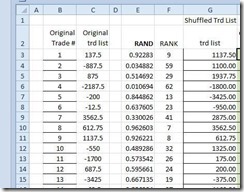 Next column to the right, which is column H, named “cumulative equity”. Begin this column in cell H3 with this formula: “=$J$1+G3″ Now, the next cell below this, which is cell H4, has a different and unique formula and you should enter cell H4 with this: “=G4+H3″. All the cells below this use this formula also.
§ Next column to the right, which is column I, named “troughs”. The formula in cell I 3 should be “=$J$1”. And to make sure that this formula works ( ! ), be sure to enter the Start Equity amount in cell J1, above J3. Let’s turn to the cell below J3 now, which is cell J4.
§ Cell J4 has a different and unique formula which is the following: =IF(AND(H4>H3, H4>=H5, H4>J3), H4, J3)
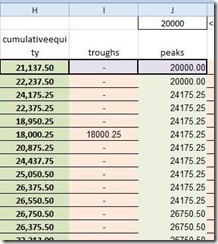
§ Next column to the right is column K, and is named “sim DD $”. This is the column where your drawdown in $ amounts will show up. Cell K3’s formula is: “=IF(ISNUMBER(I3), J3-I3,0)”
§ Next column to the right is column L, and named “sim DD %”. The formula for cell L3 is: ” =IF((K3/J3)>0,K3/J3,0)”
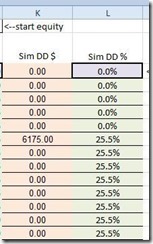
The end result of these step by step directions is this, and here’s how it should look:
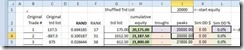
§ Make sure you have the correct formulas in row 3 and row 4, because some of the cells in row 4 are different from those in row 3.
§ You are almost finished! Pull all the rows down from row 4 down far enough to include all of your potential trades.
Paste your trades into column C, beginning at row 3, and make sure that all the columns to the right of your last trade at the bottom do not extend down below that last trade’s row.
§ IMPORTANT: Since you are the builder of this Excel spreadsheet, you’ll need to complete it on your own, and provide column totals, at the bottom below the last row, (the equity curve begins at the top in column H and extends downward to the end where your last trade is seen.)
This is what the last rows (the bottom) of your Monte Carlo Performance Analysis spreadsheet can look like, after you enter the appropriate formulas for Sums in each appropriate column:

The next step: With all of your trade records entered into this spreadsheet, you will be able to shuffle the order of the trades instantly! THERE ARE NO MACROS INVOLVED WITH THIS EXCEL MONTE CARLO SIMULATOR. Calculations are performed with the F9 button, where you have single iterations one after another. You’ll probably want to see how your system performs in 5 simulations, boom, boom, boom. See how you do with 10. By altering your basic start equity, you can change your risk parameters. IT IS A STARTING POINT FOR YOUR TAKING CONTROL OF YOUR RISK.
With each calculation, you’ll have the same ending equity levels (since you are always using the same trades, just in different order), and you can see what your drawdown is, and what peaks and valleys in your equity level to expect. You will need to do many iterations to get a sense of what your Risk of Ruin is.
We recommend that you create a chart, insert it on top of this spreadsheet in a small corner, and attach it to your equity column values in column H. This way you can get a new chart generated with every iteration, when you press F9, ,and you can see how your equity curve changes during the course of a trading campaign.
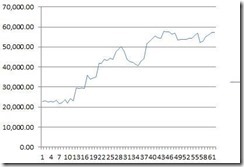
Realistically, what you can learn from this exercise, beyond the building of it, is whether or not you have a sound trading system. But this Excel Monte Carlo shuffler-of-trades only goes so far.
Most significantly, you can only perform one iteration at a time, unless you add a more sophisticated control system in the form of a macro by using VBA (Visual Basic for Applications).
That’s when you can extrapolate your Risk of Ruin after 2500 simulations! Or 10,000! Have fun!
IF YOU JUST WANT THE EXAMPLE GIVEN TO YOU,
you may download it below:
here is a Monte Carlo Excel Spreadsheet—it has MACROS- this will perform 2500 simulations at the push of a button. Two worksheets with the same calculations, one arranged horizontally and the other vertically. Enjoy
put link here <—(NOT AVAILABLE AT THIS TIME) this has MACROS for running 2500 simulations. There is no spreadsheet available as an example for downloading at this time.
Helpful Hint: There is a trading related website which has a Monte Carlo spreadsheet, and many other very good resources. Please visit this website at this web address:
https://kjtradingsystems.com/articles.html




 eminiways
You must be logged in to post a comment.