EMA waves and Excel spreadsheet

Using Microsoft Excel to Visualize Price Patterns


Simple Trading With Excel. 

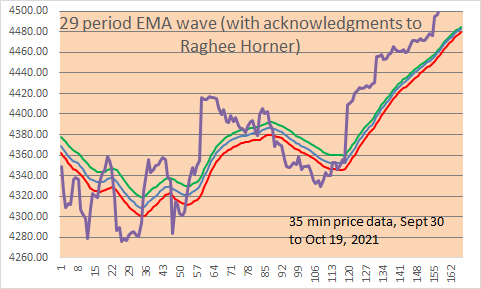
Here is a LINE CHART with 29 period EMA bands.   We show 35 minute price data, with 29 EMA of High (green line), 29 EMA of Close (blue line), 29 EMA of Low (red line).  Note: with the Excel file, you can change the EMA period if you wish, and the price data of course, and also change the colors it you wish (in your own Excel file which you can DOWNLOAD below at the bottom of the page.)

35 minute Emini S&P price data shown in all charts, for the December 2021 contract.
image

HOW TO MAKE THE ABOVE CHART MORE USEFUL FOR TRADING? 

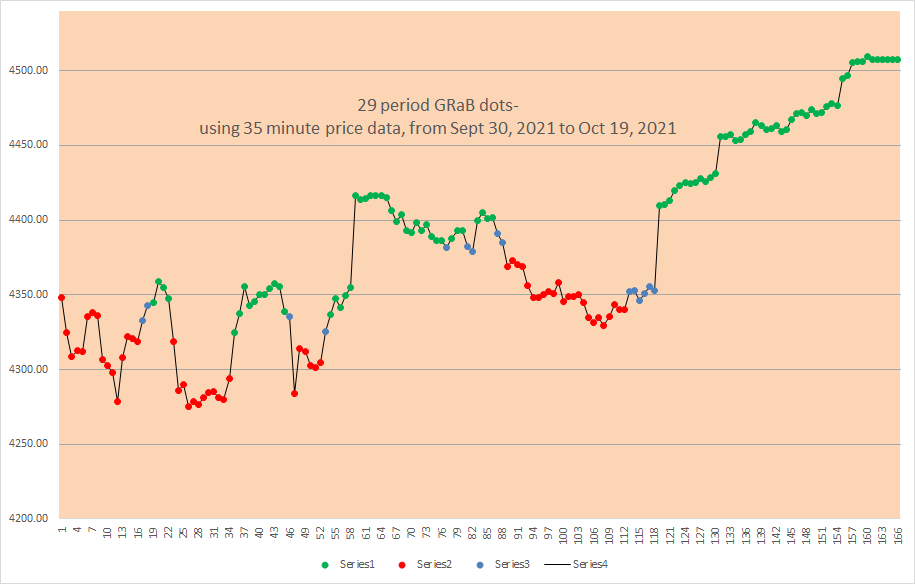
FIRST, CONVERT EACH PRICE POINT (the 35 minute closing prices) INTO A COLOR DOT, BASED UPON above the EMA lines, below the EMA lines, or between the EMA lines.   Here are the color dots, green, red, blue:
image

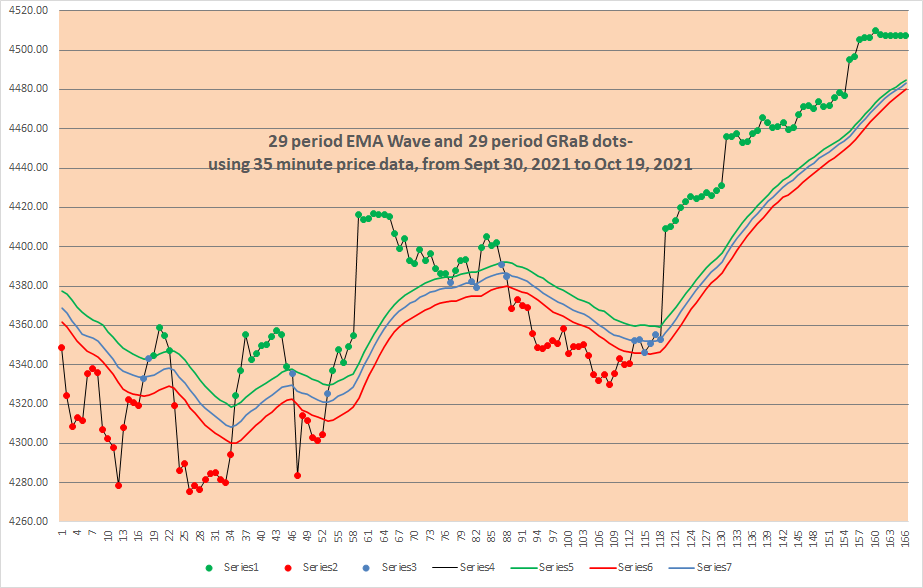
AND see below, put it all together and THIS  IS WHAT A CHART LOOKS LIKE WITH THE COLOR DOTS AND THE EMA WAVE lines:   Much better and easier to use, we think!
image

Note how green dots are ABOVE the EMA wave, red dots are BELOW the EMA wave, and blue dots are BETWEEN the EMA wave lines?

As an example of a simple trading strategy, you could Trade Long with green dots, Trade Short with red dots, and be Neutral or OUT with blue dots.

on next line- EMA waves Excel file below for download- click on “29 bar EMA waves” below (no macros, and no VBA code)

29 bar EMA waves                   

(DOWNLOAD is above)

Note: the original ideas for the EMA waves come from Raghee Horner in her book on Forex trading ( 1997 ?) .     She prefers to use the 34 bar EMA wave, and instead of dots she prefers to use Candle Stick bars with distinctive colors (red, blue, green).   Since we are not able to do the same thing with Microsoft Excel spreadsheets, this is our solution for the time being.   The key attribute of either method is better VISIBILITY/ VISUALIZATION of trends.       

Good luck with your trading!

Please view our archives for a wide variety of Excel related and trading related information.

therivertradingsystem@gmail.com
Example of an Excel Trading System

Using 35 Minute Price Data (12 bars a day)

Trading With Excel

Here is an example of how to trade with Excel, over 3+ years. Please remember all trading implies risk and monetary losses, so use the following template with caution. All traders must trade with adequate starting capital and be sure to use strict loss controls and strict and conservative sizing rules. This excel approach represents a possible approach, but does not propose to be complete or finished or exemplary in any way.

DO YOU WANT TO SEE AN EXCEL BACK-TESTING SYSTEM?

Here is a simple and non-complicated Microsoft Excel Trading System, which uses 35 minute price data for 2018, 2019, 2020, and most of 2021. Results are hypothetical and this system is presented for educational purposes only (no trading recommendations or advice is given). We offer it as a starting point for hypothesis, analysis, investigation, and statistical experimentation only, not as a completed product.

The system uses calculations for Directional Movement, developed by Welles Wilder, and the logic is explained in his book: New Concepts in Technical Trading systems.

One of the reasons for good performance is the long term bullish trend. We doubt that it would work so well in a 3-4 year ranging market with no long term trend.

(NO macros, NO VBA in the Excel spreadsheet download)

Also, please see in the archives our related post which is entitled:

“Excel Trading System Using End Of Day Price Data”

Good Luck with your trading!

Contact us at:

therivertradingsystem@gmail.com

Using the Halfway Line (between the Dips and Rallies)

Simple Trading With Excel.

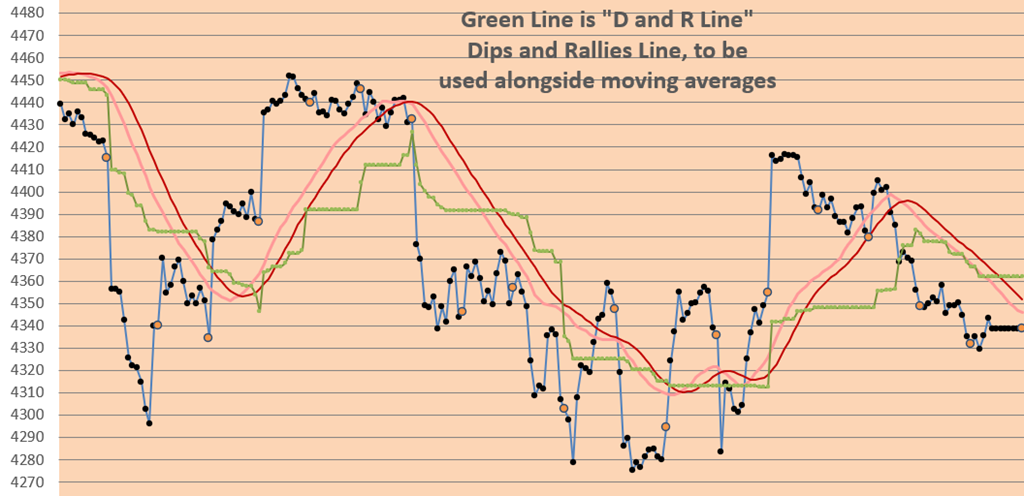
This technical indicator (shown in GREEN below) is based upon recent dips in prices and/or recent rallies in prices.   It is the halfway line between the 3 day high price line (not shown) and the 3 day low price line (not shown).  A 29 bar s.m.a. of closes is shown, and a smoothed 29 bar s.m.a. of closes is shown along side the GREEN line.  They look like this:

D and R Line

Chart above is from mid-September 2021 to mid-October 2021 (35 minute Closes).

We use it to CONFIRM the Trend Direction.   Prices below all 3 lines are trending SHORT.  And prices above all three lines are trending LONG.   If prices are between the moving averages and the GREEN LINE, then this is a neutral area.

Try it.   Good luck with your trading!

contact us at:

therivertradingsystem@gmail.com