May 14, 2024
Excel Weighted Moving Average and Ehlers Center of Gravity Oscillator
Trading with Excel Spreadsheets—or Useful Excel Calculations for Trading Analysis
We have been perusing some of the offerings that John Ehlers has given all of us, in his books, and his many article on Technical Analysis from his perspective as an Engineer.
One tool in particular, the Center of Gravity Oscillator, demonstrates how you can calculate a Balance Point in a series of Closing Prices, and that this may be useful for giving trading signals if you wish to do that. If you download and read his PDF document you can get a sense of his purpose and his mathematics.
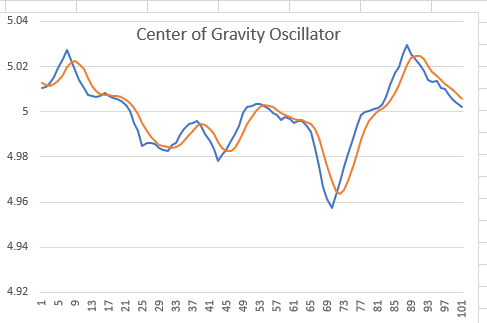
Here is the PDF document that is widely and freely available on the internet, which describes the “Center of Gravity” Indicator or Oscillator.
https://mesasoftware.com/papers/TheCGOscillator.pdf
The calculations involve the creation of a Weighted Moving Average, which we thought would be helpful to know how to create in an Excel Spreadsheet.
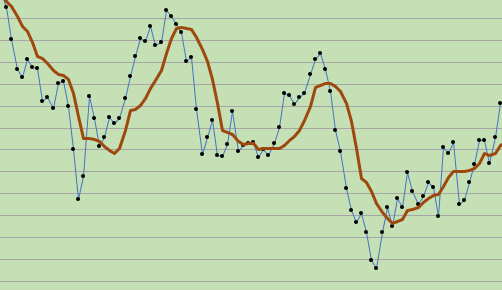
The Brown Line above is the weighted moving average (WMA).
How to Create a Weighted Moving Average (WMA) with Excel:
A description of a Weighted Moving Average (WMA) is given at this web site.
https://www.spreadsheetweb.com/how-to-calculate-weighted-moving-average-in-excel/
A weighted moving average (WMA) is designed to put more weight on recent price data and less weight on past price data. A WMA is calculated by multiplying each of the previous bar’s data by a weighting factor. The weighing factor is based on the number of bars in the selection at hand.
OUR EXCEL EXAMPLE below MAKES IT SO MUCH SIMPLER, AND MUCH EASIER, and the weighted moving average is automatically adjustable with just the use of one cell reference. You can choose whatever measure of w.m.a. that you want ( 3, 10, or 21, or 50 or whatever number you choose to use).
DOWNLOAD A FREE EXCEL SPREADSHEET BELOW (with Weighted Moving Average and Ehlers’ Center of Gravity Oscillator)
We will provide you with an Excel Spreadsheet example below that you may download to explore more fully.
| 1. shows the automated and adjustable calculations for Weighted Moving Average |
| 2. shows the automated and adjustable calculations for Exponential Moving Average |
| 3. shows automated and adjustable calculations for Simple Moving Average |
| 4. Shows how to create the Center of Gravity Oscillator and demonstrates |
| the Center of Gravity Trade Signals. |
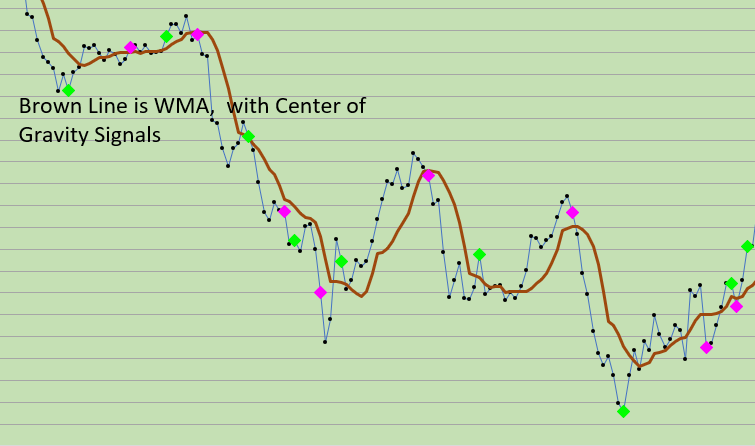
From our Excel Spreadsheet: The Weighted Moving Average and the C O G Oscillator (Center of Gravity Oscillator)SIGNALS shown here in A CHART:
Good luck with your trading! Thanks!
THE DEFAULT CONTROL VALUE THAT EHLERS ASSIGNS TO THE WMA (FOR THE C.O.G. calculations) IS TEN (10). YOU MAY WISH TO ADJUST THE CONTROL VALUE ON THE SPREADSHEET TO THE VALUE OF 10 TO SEE THE ORIGINAL APPLICATION AT WORK.
NOTE: We find that other values are more useful for our 35 Minute Price Data TIME FRAME.
 eminiways