September 10, 2022
Trading with Microsoft Excel spreadsheets.
We would all like to use Excel charts to help us trade better, and to help us VISUALIZE the trends in the emini-S&P market. We find that a smoothed Heiken Ashi Candlestick chart helps us see trends better, but there is a downside as well, which is a trend signal that is just too slow for us to use with 35 minute price data.
Both Heiken Ashi Candlestick charts (normal and smoothed) lag behind the price action as the ordinary Heiken Ashi candlestick chart is based on a 2 bar average calculation, and a smoothed Heiken Ashi candlestick chart lags even more.
But to satisfy your curiosity, we will show how to create them in the Excel spreadsheet (available for download). No VBA, and no macros.
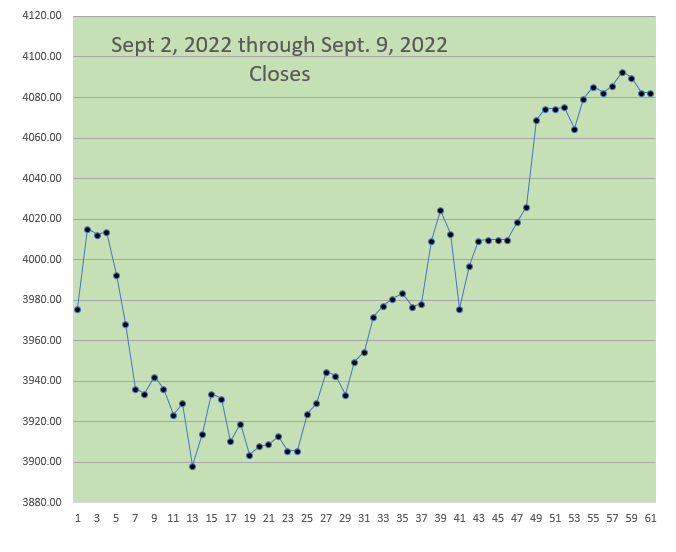
Just below is an Excel LINE CHART of recent emini-S&P price data (Sept 2, 2022 through Sept. 9, 2022):
Here is a normal Heiken Ashi Candlestick chart from the same recent data:

And here is a smoothed Heiken Ashi chart which uses the same original price data.

The charts represent price data (Open, High, Low, Close) from September 2, 2022 through September 9, 2022, using our 35 minute price data (12 bars a day).
Steps to Take With A Spreadsheet to Create Smoothed HA Candlesticks:
1. Convert ordinary Open, High, Low, Close price data to the Heiken Ashi price data.
Please see the Excel spreadsheet which is available to download below. (no VBA, and no Macros).
2. Calculate the 7 or 10 period exponential moving average of the Heiken Ashi Open, the Heiken Ashi High, the Heiken Ashi Low, and the Heiken Ashi Close. This is the first smoothing step. (You may use a lower or higher number, rather than 7 or 10, if you wish.)
3. Calculate the 7 or 10 period exponential moving average of all the data from step 2 (this is the double smoothing step). Usually you will want to make it the same number of periods as the first smoothing in step 2.
4. Create a candlestick chart of double smoothed data from Step 3 (making Candlestick bars when you insert the data into a chart).
REMEMBER, EXCEL has very limited Technical Analysis Charting ability. Once you create the Candlestick Style Bar Charts of the double smoothed Heiken Ashi you will NOT BE ABLE TO ADD TO THE CHART. In other words, you won’t be able to superimpose any other chart data (like moving averages, or data points, or other price data or indicators) on top of the Candlestick bars.
ALTHOUGH LIMITED SEVERELY, these EXCEL CHARTS are helpful with seeing trends and in confirming trends. We are focusing on the positive VISUAL benefit of the double smoothed Heiken Ashi Candlestick bars, and offer them as part of your tool box for trading with EXCEL.
Below is a Microsoft Excel spreadsheet to download which demonstrates our example of how to create a double smoothed Heiken Ashi Candlestick chart.
DOWNLOAD HERE (just below):
Smoothed Heiken Ashi Candlesticks <–download here
Good Luck With Your Trading!
 eminiways