eMini Trading System– First Steps– how to
Let’s take a moment to lay out a sequential description of how to build a trading system.
We will provide our own answers, and you can supplement or adjust or ignore, if you wish. (or contact us). Our discussion comes from 20 years of exploration in this area.
CHECK LIST TO ASK YOURSELF
A. General: choose market (we focus on ONE market to trade only, the eMini S&P). What data provider (eSignal). What platform (Excel). What brokerage (Options Xpress, Interactive Brokers).
B. The System: 1. Predictive (no), or 2. following (yes, short to medium term trend following).
3. Type of price data, EOD (end of day price data)? NO.
Intraday price data ? (yes, intraday data, using 12 equal bars each full trading day of 6.75 hours (6:30 a.m. PST to 1:15 p.m. PST) (please adjust for other time zones).
(35 Minute price bars).
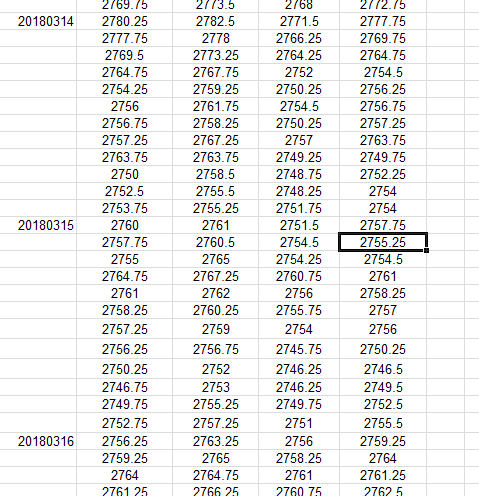
The practical application of these instructions for daily data collection means that you must enter price data into your spreadsheet at 7:05 a.m. PST (end of first bar time period), again at 7:40 a.m. (end of second bar time period), and then the price data from the third bar at 8:15. And so on, until knocking off at 1:15 p.m. PST. Only 12 data collection times, with 11 of them during the trading day, and the last at or after the Close. This can all be accomplished easily with e-Signal Interval Tabular Price data, and an Excel spreadsheet (see image above).
4. Determine a direction-based entry signal.
We have found, for our time frame of 35 minute price data, that a 29 period s.m.a. of the CLOSE, or a 29 period KAMA of the close, most accurately gives us a direction-based entry signal. Above is “long” and Below is “short”.
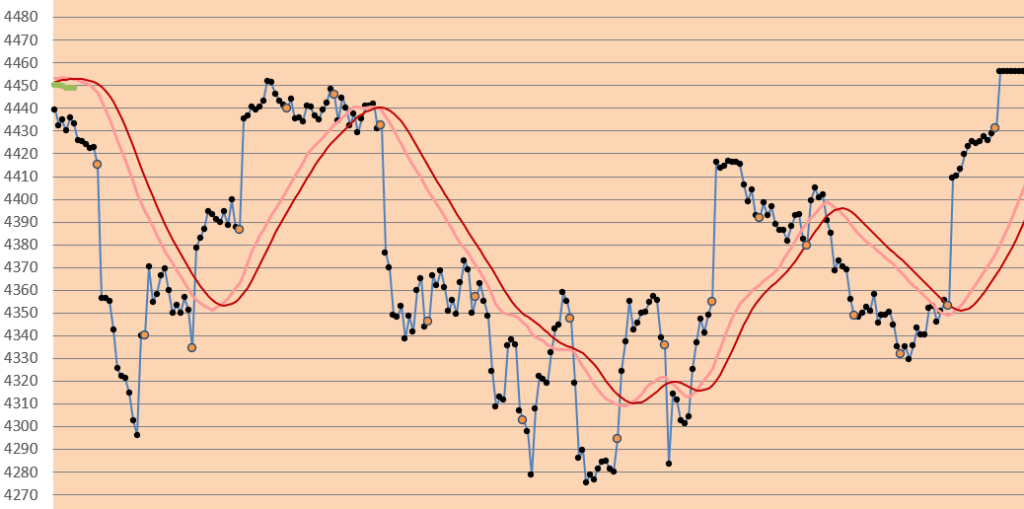
Explanation of Chart: Dark red line (ABOVE) is the 29 bar s.m.a., pale red line is its smoothed self. Orange dots are end of day closing price. This is the primary tool that we use to determine the direction of the emini S&P.
As you can see, from the example above, that this is not always simple-as-pie, right?
Please see our other posts for additional tools to use with your Excel spreadsheets.
Good luck with your trading!
contact us at:
therivertradingsystem@gmail.com
 eminiways